

How Devsy Deploys Workspaces
Devsy deploys workspaces using the "up" command, when executed Devsy builds a devcontainer, if not already available, then uses the provider to deploy the devcontainer to a workspace. Below is a sequence diagram of the main stages of the "up" command.
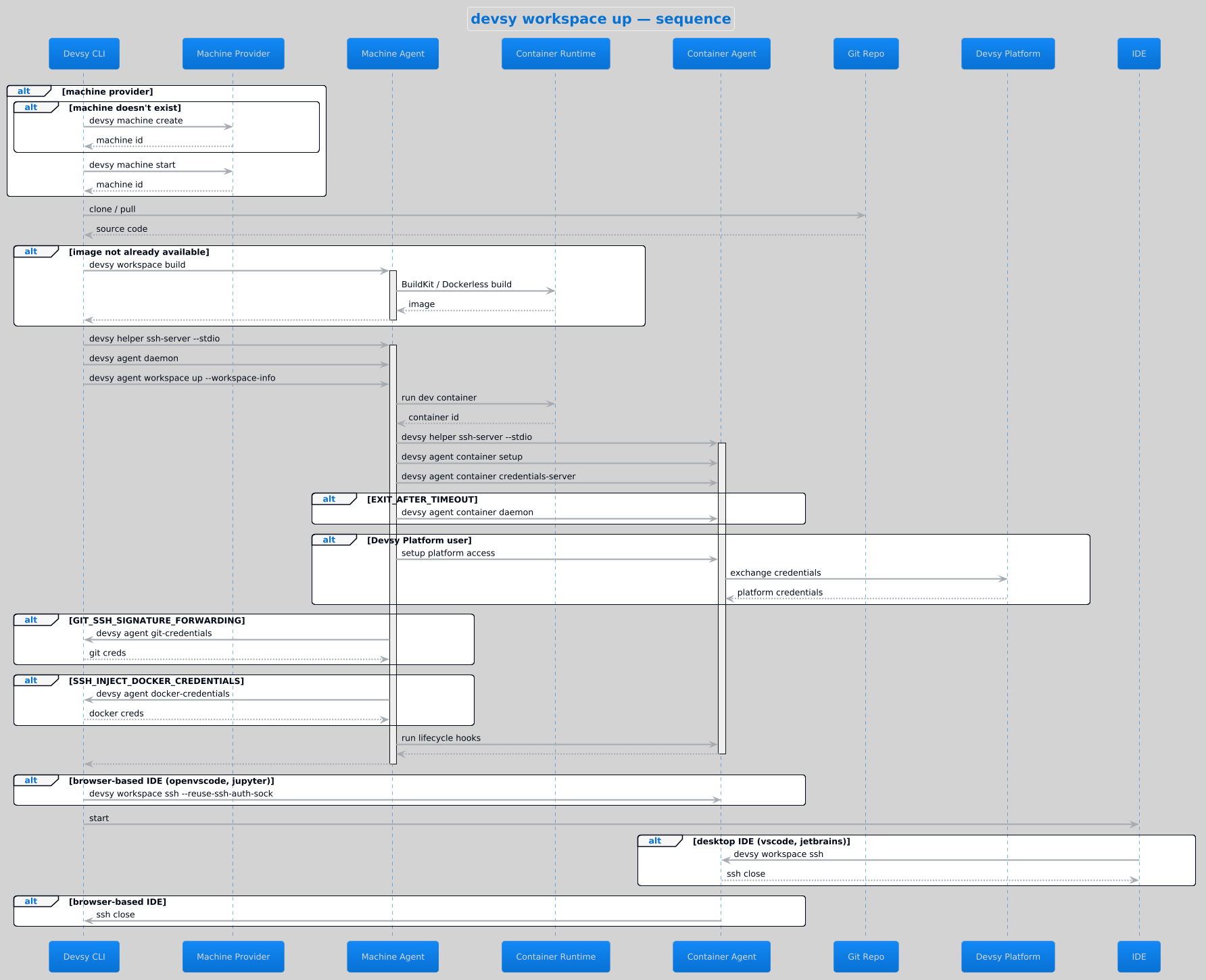
First Devsy checks if we need to create/start a machine to deploy the devcontainer to. Next we pull the source code and .devcontainer.json source from git or a local file and use this with the local environment
to build the workspace. Building is done by the agent since we need access to build tools such as docker buildx/BuildKit (Docker, Apple, Microsandbox drivers) or the dockerless in-cluster builder (Kubernetes and
other drivers without a local container daemon), i.e. devsy agent workspace build. The workspace now contains everything needed, so Devsy sets up a SSH connection to the Devsy agent running alongside the
container's control plane.
The agent receives "devsy agent workspace up" with the workspace spec serialised as workspace-info and uses the driver's control plane (the Kubernetes API for k8s, the docker/podman daemon for the Docker driver,
the local container CLI for Apple, its own sandbox client for Microsandbox) to start the devcontainer. Once started Devsy deploys a daemon to monitor activity, optionally sets up any platform access for pro
users then optionally retrieves credentials from the local environment before launching the IDE. Once the IDE has started the deployment process has complete, Devsy's agent daemon will continue to monitor the
workspace to put the machine or container to sleep when not in use.
Alternatively, devsy up --from-snapshot <ref> skips this build-and-deploy flow entirely: it restores a previously saved workspace snapshot's container
filesystem and volumes directly, so no devcontainer build is needed.
Connecting to machines
In Devsy, machines are the infrastructure that run your devcontainer. Providers like GCP, AWS, and DigitalOcean are considered "machine" providers because they first set up a virtual machine (VM) to host your container.
When you start a workspace with Devsy, such as running devsy workspace up, Devsy uses a selected provider and starts your devcontainer.
If the provider requires a virtual machine (VM), Devsy determines whether to create one. It uses your local environment's credentials and the corresponding CLI tool (e.g., aws for AWS or az for Azure) to set up the VM.
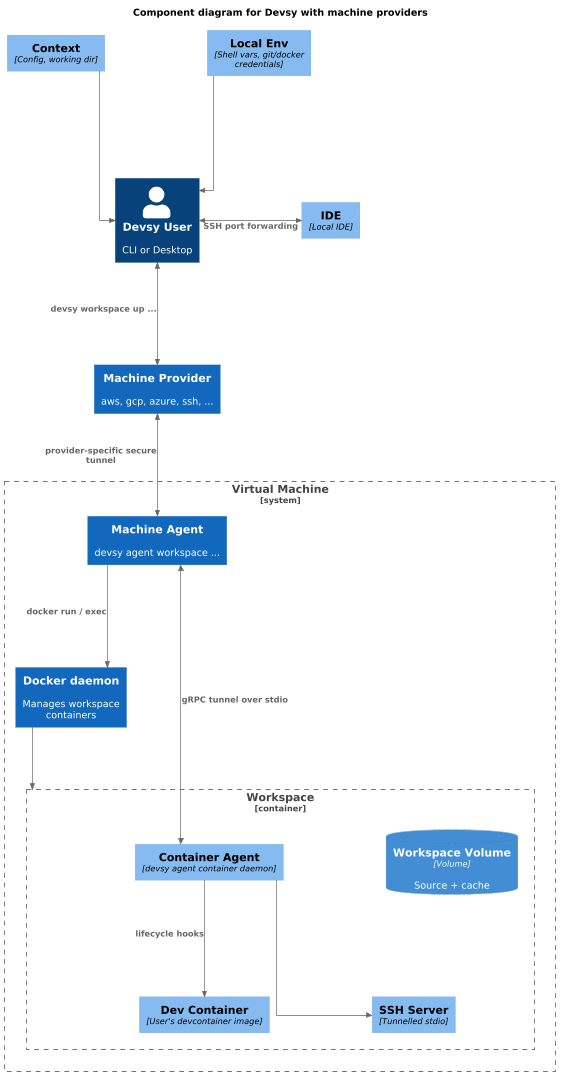
Once the VM is running, Devsy connects to it through the provider's secure tunnel. Below are examples of providers and their secure tunnels.
- AWS: Instance Connect
- Google Cloud (GCP): Cloud IAP (Identity-Aware Proxy)
- Azure: Azure Bastion
Alternatively, you can use SSH tunneling to connect to your machines, if supported by your setup.
The Devsy agent starts a SSH server using the STDIO of the secure tunnel in order for your local Devsy CLI/UI to forward ports over the SSH connection. Once this is done Devsy starts your local IDE and connects it to the devcontainer via SSH.
Connecting to Kubernetes
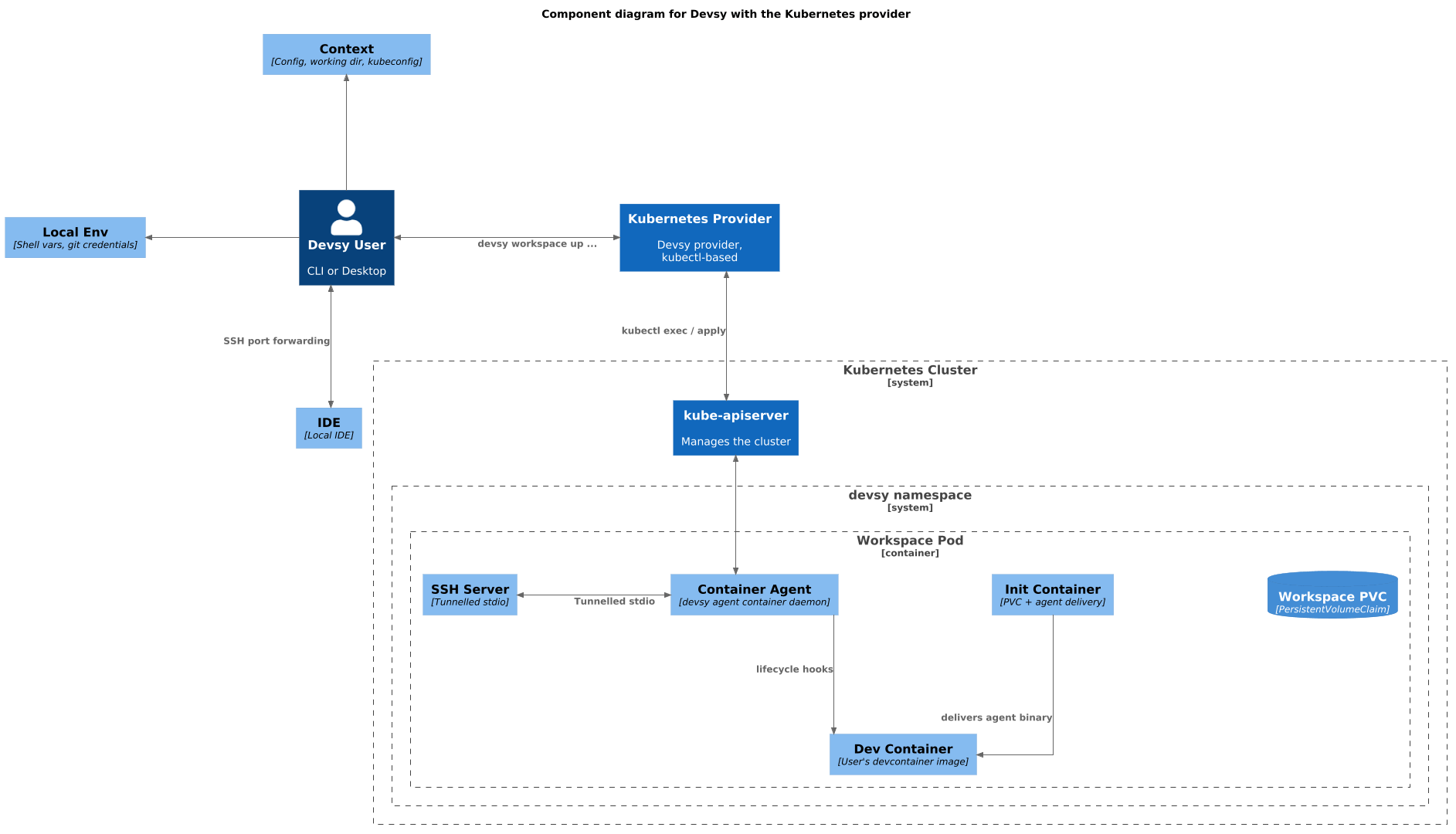
Devsy works the same with kubernetes as with Machines, the key difference is the secure tunnel is set up using the kubernetes control plane, so a separate machine-level agent is not necessary
to be run on the kubernetes node. Instead the Kubernetes driver talks to the Kubernetes API directly (pod exec/attach, the same mechanism kubectl exec uses under the hood) to start and connect
a workspace using a devcontainer.
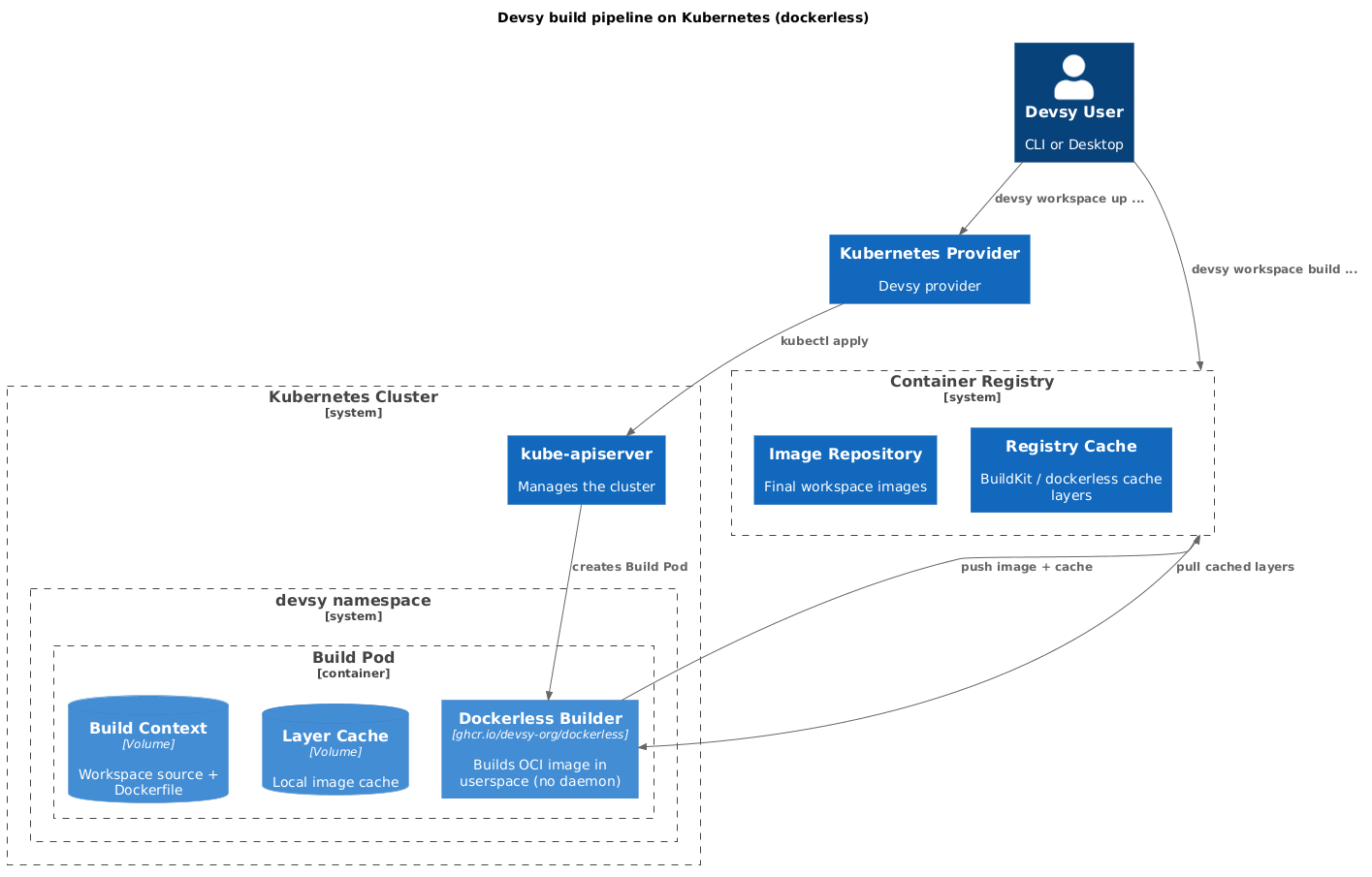
Devsy often has to build workspaces even when an "image" is specified in .devcontainer.json. This is because the devcontainer can contain "features" the cause the Dockerfile to be extended. When this happens, or simply when "build" is used in .devcontainer.json, Devsy falls back to its "dockerless" builder since the Kubernetes driver has no local container daemon to build with: the workspace pod's main container runs the dockerless build image, builds your image in userspace (see Reduce build times with a cache for more on remote caching), then execs into your devcontainer's own entrypoint in place. While building, if REGISTRY_CACHE has been specified in the context options, the dockerless builder will download existing build layers from the registry to reduce the overall build time.
Building workspaces
Devsy provides the ability to build workspaces by taking a devcontainer.json and a Git repository to compile an OCI-compliant image with everything you need to develop against using local tools.
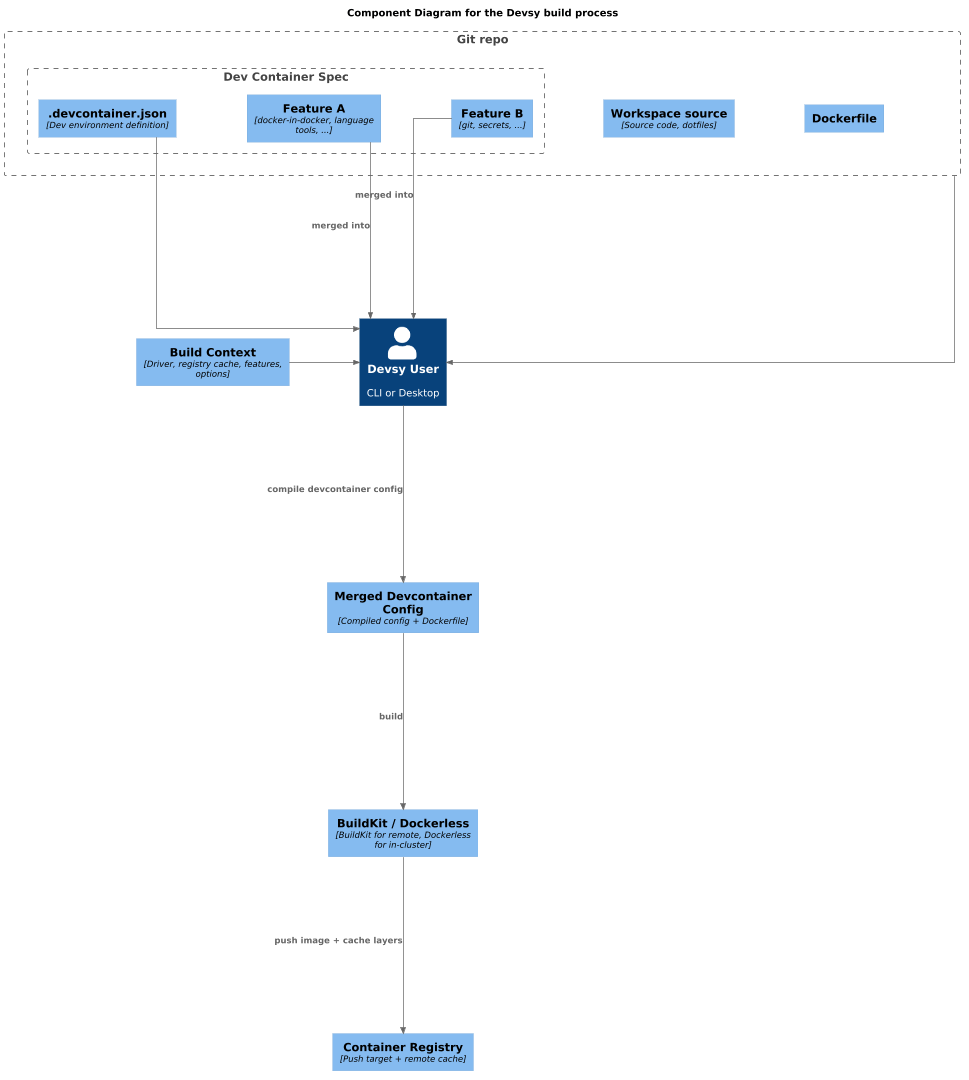
It does this by parsing the devcontainer.json, extracting the "features" and appending them as build stages to the base Dockerfile. The container is then built, depending on the driver this could be docker buildx or Devsy's internal BuildKit client (Docker, Apple, and Microsandbox drivers), or the dockerless in-cluster builder (Kubernetes and other drivers without a local container daemon), and deployed with the configuration defined by your context. Optionally once the container is built, it can be pushed to a registry to cache for other developers or in case you rebuild your workspace later. See Reduce build times with a cache.